

01

Enter the size you want
Start with a box, shelf or cabinet, enter the width, depth and height, then add shelves, drawers or doors to suit the job
When a number changes, the design changes with it
Enter the size you want, or upload a photo for the AI to draw the design, prepare the CNC cut files, and assemble it into a cabinet or shelf, with every step shown together in one view
Sign up free to start designing · pay with credits when you download files
Animated step simulation · no sound
Try adjusting the design right now
Type a width or tap add shelf, and watch the parts move to fit your design. Try it right here.
Sign up free to start designing · pay with credits when you download files
Create furniture with AI
Got a cabinet photo your customer likes, a picture from the internet, or a hand sketch? Send it to the AI assistant to read, and get a 3D cabinet design where every part is editable and the CNC cut files can be exported for real. No need to start drawing from scratch.
A cabinet photo, an example picture from the internet, a dimensioned draft or a sketch: just drag it in. Typing the sizes you want is optional

The AI reads the proportions in the photo, splits columns and shelves, and adds doors, glass doors, drawers and clothes rails as seen. If you do not give sizes it estimates them from the photo

The AI tells you what it saw and what it assumed so you can check, then you can adjust sizes, move or add shelves, and change material, joints, doors and drawers just like a design you made yourself

Parts separated with holes and grooves, nested onto material sheets, exported as G-code, SVG and DXF with a cut list, labels and an assembly drawing PDF
Uses credits, deducted only when a design comes back · see prices on the pricing page
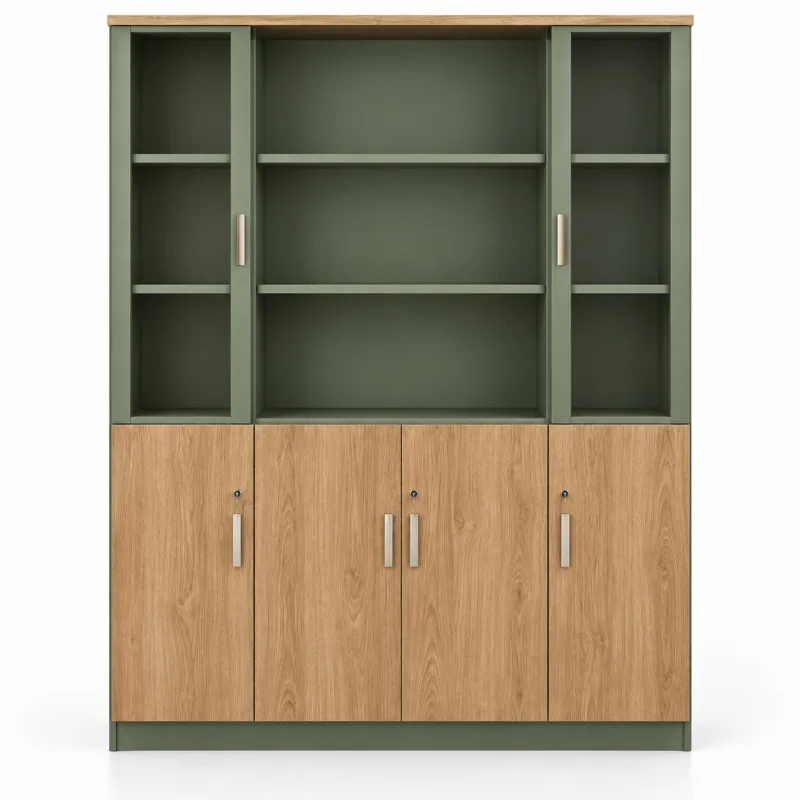
Photo of the real cabinet and the design built from it by the Prakobd engine · the 3D view hides the glass doors so the inner shelves show
Design → Cut → Assemble
Prakobd links sizes, joints and production files in a single design, cutting out the work of redrawing parts sheet by sheet
Start with a box, shelf or cabinet, enter the width, depth and height, then add shelves, drawers or doors to suit the job

Set the thickness, wood grain and machine, and choose suitable joints, with CNC bit compensation or laser kerf included

Nest the parts on material sheets, then export cut files, designs, labels and assembly steps from a single job
Prakobd is a web-based design program for boxes, cabinets, shelves and stage floor frames, for CNC shops, laser shops, sign shops and built-in furniture shops — from setting the dimensions to preparing the production files, all in one system
What Prakobd can do
A summary of capabilities from the start of the design to the cut files and on-site documents. Everything is available from the designer on the web, with no software to install
| Steps | Capabilities | Details |
|---|---|---|
| 01Design and structure | 22 templates + 236 ready-made examples | Box, tray, shelf, grid cabinet, floor cabinet, work desk, sign light box, slot-together frame and stage floor — or start from a kitchen cabinet, wardrobe or cabinet set with the sizes already filled in |
| Multi-bay cabinet set in a single frame | Divide columns and shelves freely, divide compartments equally automatically, measure outer or inner size | |
| Each side can be set independently | Turn each side on or off and set a thickness for individual sides, e.g. a thin back panel, and an inset for a raised base | |
| 10 materials + my profiles | Plywood, MDF, HMR, rubberwood finger-jointed board, pine finger-jointed board, PVC foam board, acrylic, PP board, foam board, paper. Enter the thickness you actually measure and save it as a profile | |
| Unit: millimeters or inches | Documents are shown in the chosen unit; machine files are always in millimeters | |
| 02Joints and cutting | 6 joint types | Finger joint, edge butt, dado, tab, tab with wedge lock and half-lap. Edge butt is fixed with screws, wooden dowels, Confirmat screws or T-slot nuts |
| CNC bit allowance and laser kerf | Dog-bone or T-bone inside-corner allowance, with joint fit set loose or tight | |
| Fit test kit | Cut a test piece before the real job, then choose the fit value that assembles just right | |
| Holes, grooves and cut-outs | Drill holes, slots, grooves, handle openings, vents, wire holes and curved corners, and import SVG shapes to cut patterns | |
| Wood grain with engraved part codes | Set the wood grain direction of each part, and engrave part codes or position codes with a single line | |
| 03Cabinet hardware | Drawer | Side ball-bearing slides or wooden runners — the system calculates the drawer box size from the opening for you |
| Door panel | Single or double doors, full overlay, half overlay or inset; 35 mm cup hinge holes and 96 / 128 / 160 mm handle holes | |
| Adjustable-height shelf | Drill a 32 mm row of pin holes or choose fixed shelves | |
| Clothes rail and clear acrylic doors | Add a rail in a hanging compartment of a wardrobe, and clear acrylic doors for a display cabinet | |
| 04Adjust the design in 3D | Click a slot to add a part | Click a slot in the image to add a shelf, divider, drawer or door into that slot |
| Drag or type a distance | Drag the arrows to move shelves and walls, or type a distance and press Enter. Space the shelves in a bay evenly in one click | |
| Look inside before cutting | Explode parts, hide sheets, transparent mode and the surface color of the piece, such as white, MDF, HMR or wood grain | |
| Undo and check the design | Undo or redo at every step, and see warnings before exporting | |
| 05Nesting and G-code | Nest by real shapes | Automatically nest parts onto material sheets, lock the grain direction, and show the number of sheets and the percentage of area used |
| View all sheets at once | Sheets named A, B, C with 5 zoom levels. Click to enlarge and inspect the parts and holes sheet by sheet | |
| One sheet at a time | Download DXF, SVG or G-code only for the sheets you need; a sheet that equals a full material sheet only has holes | |
| G-code for CNC | Generic and LNC ATC posts. Set them to match your machine before production | |
| 06Export, save and connect | Production file pack (ZIP) | Layered SVG/DXF, 6-view PDF drawings + 3D, cut sheet drawings, PDF/CSV cut list, hardware list, QR labels, assembly steps and STL model |
| Job info in the title block | Job name, job number, customer, notes and furniture colors are printed on the header of every drawing sheet and on the part labels | |
| Save job and .prakobd file | Keep jobs in your account under My jobs, or download the file to open and edit later | |
| Create furniture with AI | Upload a photo of a real cabinet, a draft or a sketch. The AI draws the plan and you can then adjust every value | |
| Prakobd Link | Place cut sheets in Illustrator or CorelDRAW and send shapes back as cut-outs on the design |
Adjust your cabinet and watch every part change at once
Design and preview for free · download production files with credits
Start from the right design
A template is only a starting point; you can keep adjusting the size and parts. It supports side ball-bearing drawer slides, 35 mm cup hinges and adjustable shelves on a 32 mm hole row

Box with finger joints all around; the lid is cut separately later or made as a slip-on lid

6 designs: a wavy-sided shoe rack, an oval wall shelf, a pedestal side table, an oval coffee table on arched legs, a stacking cube, a nightstand — through-tenons in slots and half-laps, no screws, no glue

A round top, 4 legs arching to meet in the middle, their ends hooking under a locking ring, leg tenons into slots under the top, no screws, no glue, cut from one sheet

2 arched ladder uprights with a rung at every shelf, arched feet, stadium / rectangular / rounded shelves tilted through the uprights' windows and turned flat onto the rungs, notched round the uprights, no screws, knock-down

A box with a lid at the top: a hinged lid, a slip-on lid, or a long case that opens flat in two halves (a fishing-rod case with notched rod racks); compartments, hinges, latches, a handle

5-sided tray, can be divided with cross-notched panels

Display cabinet, mezzanine, single-box unit

2 sides, slotted shelves, thin back panel

Vertical partition wall + separate shelves in every bay

Full-height sides hiding the base, thin back panel, ready to take drawers/doors

Semicircular arched cabinet top (grooved panels bent over a curved frame) or a face frame with an arched opening

Bend a single sheet into several sides: gabled house (donation box), model cover, U-shaped stand, wall shelf, steps, stepped pocket, clear document tray — fold lines are in the file

Custom-height lotus-petal backdrop. 9 mm plywood assembled as a box, split into boxes that bolt together, raised platform base, offering table platform, 2-layer raised gold edge, oval picture frame, back braces, vinyl print file

Circular wooden frame made of 3 layers joined like jigsaw pieces, interwoven mullions, half-circle opening sash, built-in glass rebate, trim, and a glass cutting order

Gabled house with arched door, paw-print/heart motif above the door, 4-pane window, scalloped roof edge, with a side run — or a stacked cat box with a cat-head/TV front, assembled with wedge-lock tabs

HMR/MDF sheets grooved with 30 wall decoration patterns: arched curves up and down, square grooves, U-grooves, honeycomb, brick, raised panel, herringbone and more. Large walls are split into several sheets with continuous patterns

2 sides, with the back extending up into a header sign, multi-level shelves, solid base box, with straight, sloped or wavy sides — flat sheets slotted together (PVC foam board) or folded from a single sheet with crease lines (corrugated board, PP board). The print frame is included in the file

Shallow box with grooves to hold an acrylic front panel, cable holes and vent holes

Cross-notched panels in an X shape slotted into the base panel, assembled without glue

Tabletop, wooden-panel or steel legs, privacy panel, desktop divider panels and a built-in drawer unit

The middle cabinet has double doors and shelves, with semicircular curved ends at both sides (kerf-bent or bending plywood). The 40 mm round-end top overhangs all round, and the plain back lets it stand in the middle of a room.

A single grid frame of cross-notched panels the size of the stage; long panels are cut with puzzle joints, brace pin holes at every crossing, and floor panels drop in exactly between the frames
Ready-made examples
Ready-made examples come with standard Thai furniture sizes, shelves, doors and drawers already set. Pick one, then adjust every size and part value as you like
Clear acrylic box, donation box, model display case with base, PVC foam board box, light box — for sign shops and acrylic shops
Floor-standing product display shelf (POP) for malls and shops: straight, slanted stepped, tapered-top with raised-edge tray, wavy curved sides — PVC foam board, folding corrugated board, folding PP board, with header sign and printed-artwork frame
Base cabinets on adjustable feet, wall cabinets, tall cabinets, kitchen sets with tops — standard Thai kitchen sizes
Wardrobe with hanging rail, drawer cabinet, bedside cabinet, dressing table
TV cabinet, shoe cabinet, sideboard, display cabinet, coffee table, dining table
Wall-hung vanity cabinet with top, mirror cabinet, towel shelf, washing machine enclosure
Multi-bay cabinets in a single frame, and full-wall built-ins
Bookshelf, TV shelf, shoe shelf, grid cabinet, storage shelf
Product display shelf, glass display case, counter, display stand, lightbox sign
Work desks, meeting tables, desk clusters, file cabinets, lockers, under-desk drawer units
Gift box, toolbox, divided tray, pen holder (can be made with a laser)
Interlocking block stage floor, standing sign, podium
Lotus-petal ceremonial booth, 9 mm plywood built as boxes, bolt-together assembly, raised gold border, oval picture frame, vinyl print file (CNC job)
Wooden round window, 3-layer jigsaw-joined frame, half-circle opening sash, built-in glass rebate, trim, glass cutting order (CNC work)
HMR wall panels grooved with 30 patterns: arched curves up and down, square grooves, U-grooves, slats, honeycomb, brick, lotus raised panel, herringbone, Moroccan, 3D boxes — large walls are split into several sheets with continuous patterns
Cat house, gabled dog house, paw-print motif, heart, window, scalloped roof edge, house with run, stacked cat box with cat-head/TV front, clear-door cat cabinet on wheels — assembled with tabs, no screws
One design, all the way to the job
Prakobd exports both machine files and production documents, so designers, cutters and assemblers all work from the same job data
CUT-OUT · CUT-IN · POCKET · DRILL · SCORE
Nest by real shapes, lock the wood grain, generic / LNC ATC post
6-side elevation drawings + 3D, cut sheet layouts and assembly steps
PDF / CSV hardware list and part labels with QR codes
The assembled sheet model, in millimeters, ready to open in 3D software
Inside-corner allowance with dog-bone / T-bone supports grooving and drilling, plus a fit test kit before cutting the real job
Compensates kerf to suit the material, lets you choose the joint, and exports layered cut files for further use
Finger joint · edge butt · dado · tab · tab with wedge · half-lap

From small shelves to stage floor frames
Interlocking blocks build one continuous grid frame to the stage size, splitting long panels with jigsaw joints, with a brace dowel hole at every crossing
Fits the way you work
Place a job from the web into Adobe Illustrator or CorelDRAW, and send shapes from the document back as cut-outs on the design
View the plugin and how to install itDescribe the size and what you need in plain sentences. The AI assistant creates the design for you, then fine-tune the size and details in the designer.
Try the assistant in the designerBefore starting the first piece
Prakobd is a web-based design program for built-in cabinets, boxes, shelves and stage floor frames, for CNC shops, laser shops, sign shops and built-in furniture shops. Set the dimensions and joints, then generate the production file pack in one system
No. Prakobd (prakobd.com) is software for designing cabinets and preparing cut files for CNC routers and laser cutters. It does not offer furniture assembly, disassembly or moving services. The name Prakobd comes from the program's goal: parts cut from the files must assemble correctly. Easy to design, precise to cut, good to assemble
Nothing to install. Prakobd runs in a web browser — open the designer and start right away. Install the Prakobd Link plugin only if you want to place jobs into Adobe Illustrator or CorelDRAW
Yes. There are 42 ready-made examples in 7 categories: kitchen (base cabinets, under-sink cabinets, wall cabinets, tall cabinets), bedroom (wardrobes, chests of drawers, bedside cabinets), cabinet sets (7-door wardrobe, glass-door display cabinet, TV cabinet, large bookcase), shelves, shops and offices (work desks, multi-seat desk clusters, pinwheel L-shaped desks, wood or steel legs, dividers), boxes and trays, and stage work. Every design can be resized and its parts adjusted further
Prakobd's strength is the workflow from design to production prep. It has 22 templates and ready-made examples, 236 designs, 6 joint types, drawers, hinges, adjustable shelves, clothes rails, stage floor frames, nesting and G-code. Everything is done from entering sizes to getting cut files and site documents in one program.
CNC jobs support plywood, MDF, HMR, finger-jointed rubberwood, finger-jointed pine and PVC foam board. Laser jobs support acrylic, PP board, foam board and paper. You can set the thickness, sheet size and bit yourself, and choose a surface color such as white, MDF, HMR or wood grain to show in the 3D view and print on the drawing
Yes. There are side ball-bearing drawers, 35 mm cup hinges, adjustable shelves on a 32 mm hole row, clothes rails in hanging compartments and clear acrylic doors. Click a compartment in the picture to add shelves, dividers, drawers or doors, then type a distance or drag the arrows to move it
Prakobd exports layered SVG and DXF for use with CNC or laser cutting software, plus generic and LNC ATC G-code. Choose the post and set it to match your machine's controller before production
Jobs using the supported generic or LNC ATC post can be nested and have G-code created in Prakobd. If your machine or production workflow needs specific settings, you can take the SVG or DXF and carry on in CAM software
For Prakobd laser jobs, kerf is already allowed for in the lines. Set the machine to cut right on the line with no extra compensation. For CNC jobs, the lines in the file are the true part size: cut CUT-OUT outside the line and CUT-IN inside the line. Inside corners already have dog-bone or T-bone relief built into the shape
Yes. The nesting page arranges parts on material sheets by real shape and wood grain direction. It tells you how many sheets you need and the percentage of area used, shows all sheets together, lets you zoom into one sheet at a time, and lets you download DXF, SVG or G-code one sheet at a time. A sheet the same size as the material sheet is drilled only, without edge trimming
You get layered SVG/DXF with CUT-OUT, CUT-IN, POCKET, DRILL and SCORE layers, plus a 6-side PDF drawing with a 3D view, cut sheet layouts, a PDF/CSV cut list, a hardware list, QR labels, PDF assembly steps, G-code and an STL assembly model. There is also the Prakobd Link plugin for placing jobs in Adobe Illustrator and CorelDRAW
The review and export step shows the design's cautions, such as thickness that does not match the material name, the nesting page showing parts larger than the material sheet, and the cut sheet drawings showing parts that need the sheet flipped to groove the other side. In the exploded 3D view you can hide sheets or switch on transparent mode to see inside, and download the fit test kit to test-cut before the real job
Yes. Save the job in your account on the My jobs page, or download it as a .prakobd file to open and edit later or pass on. While designing you can undo and redo
Yes. Upload a photo of a real cabinet, a reference photo you like, a draft with sizes, or a sketch. The AI assistant reads the image and draws the cabinet right away, dividing columns and shelves as in the picture and adding doors, glass doors, drawers, shelves and clothes rails as it sees them. If you don't give sizes, the AI estimates from the proportions in the picture. You can then edit every value and export cut files just like a design you made yourself. Typing a text description alone also works
The AI assistant uses credits at the price shown on the pricing page. Credits are deducted only when a design is returned. If the image cannot be read or the connection fails, no credits are deducted. Top up credits on the pricing page.
The designer is open to members. Sign up free with an e-mail or Google account, then design, save jobs, and view 3D and nesting for free. New members get welcome credits to try a PDF example. Downloading production files and using the plugin cost credits
Prakobd uses a credit top-up system, with no monthly or yearly fees. Design for free, then credits are deducted when you download files. A production file pack is priced by the number of material sheets in the job, with a cap per job. The download button always shows the price before you press it. Credits never expire. See current packs and prices on the pricing page
The plug-in block template builds a single grid frame to the stage size; long panels are split into segments with puzzle joints, with brace pin holes at every crossing, and a panel layout plan PDF is exported for on-site assembly
You can choose millimeters or inches and lock the wood grain direction while nesting. Documents are shown in the chosen unit, while machine files (SVG, DXF and G-code) use millimeters
The home page has a step demo you can try within 1 minute. Real working time depends on the complexity of the design, the number of parts and the machine settings. Check the design and the fit test kit before real production
Easy to design | Precise cuts | Good assembly
Open the first design, enter the size, and see what your idea can be built into
Sign up free and start designing right away